
「戦績振り返り」を更新しました。
マイリプレイ一覧の録画から、プレイヤー名や段位を読み取る処理を改善しました。
Updated MatchRecord.
Improved how MatchRecord reads player names and ranks from recordings of the My Replays list.
「戦績振り返り」を更新しました。
マイリプレイ一覧の録画から、プレイヤー名や段位を読み取る処理を改善しました。
Updated MatchRecord.
Improved how MatchRecord reads player names and ranks from recordings of the My Replays list.
「復習する」に「まとめてクイズ」を追加しました。
間違えた問題や保存した問題だけを、キャラをまたいで続けて解けます。苦手な技をまとめて復習したいときにどうぞ。
Added Quiz all to Review.
You can now quiz yourself on just your missed or saved questions, across characters. Give it a try when you want to review the moves you struggle with.
「リプレイ振り返り」を更新しました。
・試合の区切りを判定する処理と、解析の進み具合の表示を改善しました。
・再生バーに1フレーム送り・戻し、スロー再生(0.1/0.25/0.5倍)、全画面を追加しました。
・MATCH TIMELINEをクリック・ドラッグして再生位置を動かせるようにしました。
・「CAPTURE + NOTE」は「メモ」になり、右のメモ欄でそのまま書けるようにしました。
・試験機能: PCで選んだ試合をMP4に保存し、YouTubeに投稿した動画のURLを書き出したクリップに登録できるようにしました。VFPrepではGoogle認証を代行しないので、投稿は手動です(めんどくさい!)。端末連携したスマートフォンでも、試合を開けます。
Updated Replay Scope.
• Improved match boundary detection and made analysis progress easier to follow.
• The player bar now has frame-by-frame stepping, slow motion (0.1, 0.25, 0.5x), and fullscreen.
• Click or drag the MATCH TIMELINE to move the playback position.
• CAPTURE + NOTE is now Memo, and you write the note right in the notes panel.
• Experimental feature: Save selected matches as an MP4 on your PC, then register the URL of the video you upload to YouTube with the exported clip. VFPrep does not handle Google sign-in, so uploading is manual (a hassle!). You can also open the matches on a paired phone.
「データの行き先」を追加しました。
・動画・戦績・メモなどがどこに保存され、何が端末の外へ送られるかを確認できます。
Added Where your data goes.
• See where your videos, match records, and notes are stored, and what is sent outside your device.
サイト全体のチュートリアル「FIRST PREP」を追加しました。
・使用キャラクターを選び、対戦の振り返りから技の確認、メモ、次の対戦への準備までを、アニメーションで紹介します。メニューの「使い方ガイド」から開けます。
Added FIRST PREP, a site-wide tutorial.
• Choose your character and follow an animated introduction to reviewing matches, checking moves, taking notes, and preparing for your next match. Open it from “How to use” in the menu.
「FlowBuilder」を更新しました。
・「12F割り込み」「投げ有効 +6F〜」の自動チェックを、画面上で個別に切り替えられるようにしました。
Updated FlowBuilder.
• You can now toggle the “12F Interrupt” and “Throw +6F” automatic checks independently using on-screen controls.
「直前メモ」を更新しました。
・確定反撃リストの一部の技に、動きを重ねて見られる「モーションゴースト」画像を追加しました。
Updated LastMin Note.
• Added “Motion Ghost” images to selected moves in the guaranteed punish list, showing overlapping poses to help you recognize each move.
「FlowBuilder」を更新しました。
・ダッシュやガード、避けなどの行動カードを追加しました。
・連携に「派生」「ヒット確認」「ディレイ」の条件を付けられるようになりました。
・残したい連携を囲んで文章を確認・編集し、「攻略ノート」と「直前メモ」へまとめて追加できるようになりました。追加の取り消しにも対応しています。
Updated FlowBuilder.
• Added action cards for dashes, guards, evades, and more.
• You can now add branch, hit-confirm, and delay conditions to your strings.
• Circle a string you want to keep, review and edit the text, then add it to both Strategy Notes and LastMin Note. You can also undo the additions.
「GYM」に「GO FOR LAUNCH」を追加しました。
・ガス噴射で障害物を越えるタイムアタックゲームです。スマートフォンのタッチ操作にも対応しています。
Added GO FOR LAUNCH to GYM.
• A time-attack game where you use gas thrusters to clear obstacles. Smartphone touch controls are also supported.
「リプレイ振り返り」「戦績振り返り」のSteam録画選択画面を更新しました。
・録画ごとの容量と合計容量を表示し、容量が大きい順に並べ替えられるようになりました。
・不要な元録画を、確認画面から削除できるようになりました。
Updated the Steam recording picker in Replay Scope and MatchRecord.
• View individual and total recording sizes, and sort recordings by size.
• Delete unwanted source recordings after confirmation.
「直前メモ」を更新しました。
・技コマンドの方向表記を、数字と矢印で切り替えられるようになりました。
Updated LastMin Note.
• Switch move-command directions between numbers and arrows.
表示を調整しました。
・「リプレイ振り返り」と「FlowBuilder」と「戦績振り返り」がライトモードに対応しました。
Updated the appearance.
• Added light mode support to Replay Scope, FlowBuilder, and MatchRecord.
「直前メモ」のコンボ入力を改善しました。
・使用キャラと始動技が同じなら、別の対戦相手に登録したコンボを候補から選んで入力できます。
・他の相手にコンボを登録済みの始動技を、選択欄の上にまとめました。
Improved combo entry in LastMin Note.
• For the same character and starter move, you can select a combo saved for another opponent to fill the entry.
• Starter moves with combos saved for other opponents now appear at the top of the selector.
「直前メモ」を更新しました。
・攻略ノートと連携しました。相手キャラの「対策ノート」と、自分の「課題」を並べて表示します。
・UIを整理しました。
LastMin Note has been updated.
• Now linked with Strategy Notes. Your matchup notes for the opponent and your own focus points appear side by side.
• Cleaned up the UI.
「攻略ノート」を更新しました。
・ノートを直前メモに出すキャラと、自分のメインキャラを設定できるようにしました。
Strategy Notes has been updated.
• You can now choose which character each note appears for in LastMin Note, and set your main character.
「戦績振り返り(MatchRecord)」を追加しました。
マイリプレイ一覧の録画から戦績を取り込み、対戦の傾向を振り返れます。
・相手別、キャラクターの相性、セッションごとの戦績を表示。
・Replay Scopeの保存済み試合と照合し、戦績から該当する映像を開けます。
・PCとモバイルの同期、バックアップの保存・復元に対応。
Added MatchRecord.
Import match records from recordings of your My Replays list and review your match trends.
• View results by opponent, character matchup, and session.
• Match records with saved matches in Replay Scope and open the corresponding footage.
• Sync between PC and mobile, and save or restore backups.
Replay Scopeを更新しました。
・Steamの録画フォルダーから、サムネイル一覧でクリップを選べるようになりました。
・MatchRecordとの連携で、試合のキャラクターと対応する戦績を確認・確定できます。
・試合の終了位置を手動で指定し、終了未確定の試合を確定できます。
Updated Replay Scope.
• Select clips from a thumbnail list in your Steam recording folder.
• Review and confirm a match’s characters and corresponding match record through MatchRecord integration.
• Manually set the end position to confirm matches whose ending is still unconfirmed.
攻略ノートを更新しました。
主に、長期的な利用に向けた更新です。
・バックアップの保存・復元と、Markdown書き出しを追加。
・同期状況と最終同期時刻を表示。
・リプレイの該当場面へ戻るリンクを追加、など。
Strategy Notes has been updated.
This update mainly supports long-term use.
• Added backup, restore, and Markdown export.
• Added sync status and the last successful sync time.
• Added links back to specific replay moments, and more.
・「攻略ノート」を更新しました。
Note Signalsを使ったフィルターを追加しました。「要確認」、キャラクター、対戦結果(My WIN / My LOSS)でノートを絞り込めます。検索や並び順とも組み合わせて使えます。
• Strategy Notes has been updated.
Note Signals can now be used as filters. You can narrow your notes by Needs review, character, or match result (My WIN / My LOSS), and combine them with search and sorting.
・「攻略ノート」を更新しました。
新しく Note Signals を追加しました。キャラクター名と技コマンドを書くと、対応する技を認識し、その場でMove Dataを確認できます。? を含むメモは「要確認」として絞り込みできます。
VF5 R.E.V.O. World Stageの13 UI言語で使われている公式キャラクター名にも対応しました。入力した表記はそのまま保持されます。
• Strategy Notes has been updated.
Note Signals are now available. When you write a character name and move command, the matching move is recognized so you can open its Move Data directly from the note. Notes containing “?” can also be filtered as Needs review.
Official character names used across the 13 languages supported by VF5 R.E.V.O. World Stage are recognized, while your original wording is preserved.
・を更新しました。
・新しく「」を追加しました。
Replay Scopeのメモも、普通のメモも、ひとつの場所でまとめて使えます。PCとモバイルの同期にも対応しました。アカウントは不要です。ノートは端末側で暗号化して保存され、QR/ペアリングコードで端末を連携できます。
has been updated.
A new section is now available.
Notes from Replay Scope and regular notes can now be kept together in one place. Strategy Notes can also sync between PC and mobile, with no account required. Notes are encrypted on your device before being stored, and devices can be paired using a QR code or pairing code.
を更新しました。対戦相手のリングネームを隠して、対戦クリップを書き出せるようになりました。
Updated . You can now export match clips with your opponent’s ring name hidden.
を更新しました。WebM動画の読み込みに対応し、対戦クリップの書き出しに3つのモードを追加しました。解析中の書き出しでは、解析を続けるか書き出しを優先するか選択できます。
Updated . You can now import WebM videos, and match clip export includes three modes. When exporting during analysis, you can choose whether to continue the analysis or prioritize the export.
を更新しました。難易度設定とアケコン操作に対応し、メテオの視認性・反応判定、ゲーム速度、評価ロジックを調整。プレー内容を分析する作戦報告書形式のリザルトも追加しました。
Updated with difficulty settings and arcade-controller support.
Refined meteor visibility and response timing, game speed, and evaluation logic, and added an after-action report-style results screen that analyzes each run.
[連携を組む] FlowBuilder に、成功避け23Fを前提とした被避けリスクの計算機能を追加し、あわせて使い勝手も改善しました。
Added an evade-risk calculator to [Build Links] FlowBuilder based on the 23F successful-evade assumption, along with general usability improvements.
Ver.1.10関連の動画を、Lionまで差し替えました。データも全キャラ分、リリースノート準拠の内容に更新済みです。
Replaced the Ver.1.10-related videos through Lion. Data for all characters has also been updated to match the release notes.
Ver.1.10の特設ページを作成しました。最上部バナーからアクセスできます。参考として、Ver.1.00アップデートも収録しています。
Created a dedicated page for Ver.1.10, accessible from the top banner. As a reference, the Ver.1.00 update is also included.
Dataセクショントップに技の検索機能を追加し、ソート問題を解消しました。あわせて、データ詳細UIも微調整しました。
Added a move search feature to the top of the Data section, fixed the sorting issue, and made minor refinements to the data detail UI.
Duralの技フレームデータをゲーム内スタッツベースに修正しました。
Corrected Dural's move frame data based on actual in-game stats.
FlowBuilder(連携フローチャート)機能に、画像抽出機能と、エクスポート・インポート機能を追加しました。
FlowBuilder (Linked Flowchart) now includes image extraction, export, and import features.
データセクションの詳細表示レイアウトを変更。有利フレームの数字に+表記抜けを修正。
Updated Data section detail layout. Fixed missing '+' sign on frame advantage numbers.
言語設定をEN設定にして、各機能からトップ画面に戻った時のサポート機能が実装されて無かったので追加しました。
Fixed missing support for returning to the top screen from each feature when English is selected as the language.
新モード「KUMITE (10本組手)」を追加。全キャラランダム出題の実戦モードです。クイズからどうぞ。
Added new mode "KUMITE". Random all-star battle mode under Quiz.
Topとテーマのデザインを更新し、ダークモードを追加。さらに、NewTopページから各モジュールへの説明を整理しました。
Updated the design of the top page and overall theme, added dark mode, and refined the descriptions of each module on the NewTop page.
Gymアクティビティをバージョンアップしました。紫の波紋、隕石、コンボ、早い反応ボーナス、リザルト分析、チュートリアルが追加されました。
Upgraded Gym activity with purple ripples, meteors, combos, fast reaction bonuses, result analysis, and tutorials.
FlowBuilderにDural対応を追加。
Added Dural support to FlowBuilder.
DataにDural対応を追加。
Added Dural support to Data.
QuizにDural対応(確定反撃技)を追加。
Added Dural support to Quiz. (Punishable moves)

コンタクトは @WareDaKore まで。
Contact to @WareDaKore.
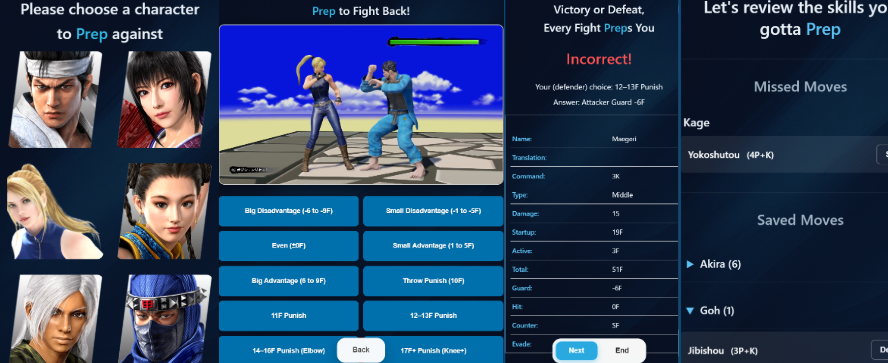
キャラ別の主要技に対しての有利不利を、アクションラーニング形式で、アウトプットしながら反復練習することができます。
まずは、自キャラや良く対戦するキャラの技を見てみるのはどうでしょうか?
繰り返しやって慣れてきたら、実戦での「ここは暴れる」「ここはガード投げ抜けに徹する」などの判断が確信を持って出来るようになるかもしれません。
You can practice frame advantage and disadvantage against key moves using an output-focused "Action Learning" method.
Why not start with your own character or the opponents you face most often?
As you repeat the process, you'll gain the confidence to make split-second decisions
in real matches—knowing exactly when to interrupt or when to stick to defensive options.
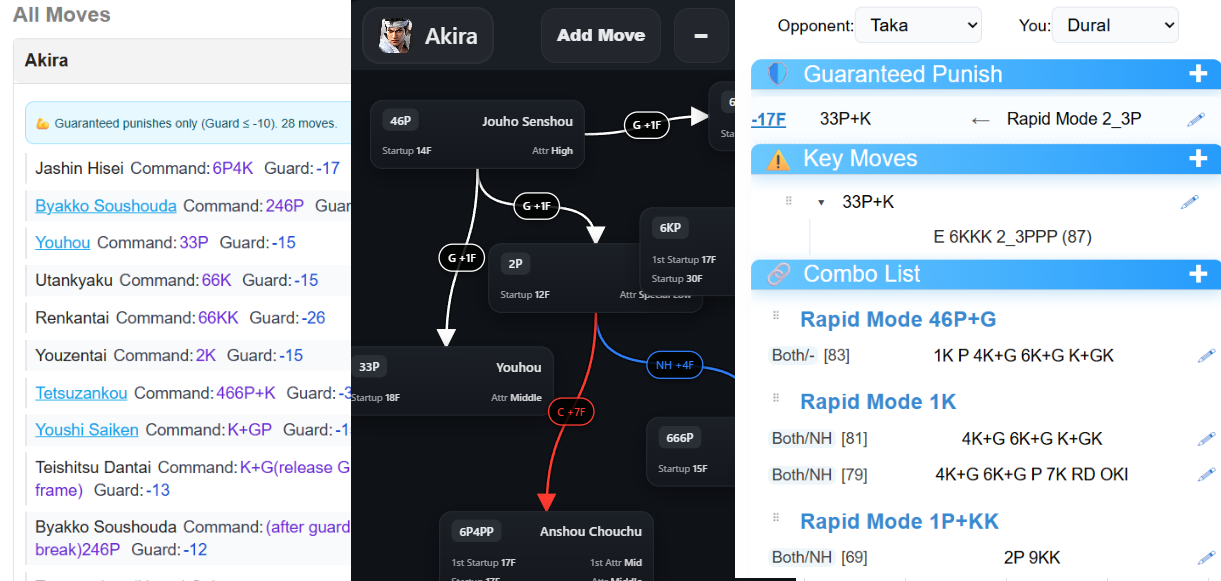
Dataセクションでは、各キャラの技の詳細データを見ることが出来ます。
技リストに加えて、確定反撃をリストアップするショートカットや、発生順など並び替えなども出来るので、
まずは、自キャラのゲーム内チュートリアルで紹介されている代表的な技を、ここで確認してみるのはどうでしょうか?
次に、FlowBuilderでその代表技を中心に連携を組みながら、
「この技がヒット後は、何を選択肢にするか?ガードされたら?」などと、少しずつ実際にプレーもしながら設計していくと頭の整理になるでしょう。
また、技を知り、その連携を設計したら、LastMin機能で相手キャラ別にあなたが考える重要なポイントをまとめておくのも良いでしょう。
実戦では準備の数割しか活かせないかもしれませんが、それも楽しみの一つです。
ナイスチャレンジ!
In the Data section, you can view detailed specs for every character's moves.
In addition to move lists, there are shortcuts for guaranteed punishes and sorting options like startup speed. Why not start by checking the signature moves introduced in your character's in-game tutorial here?
Next, use FlowBuilder to build strings around those moves. As you play and design bit by bit—asking "What are my options on hit? What if it's guarded?"—it will help organize your thoughts.
Once you've learned the moves and designed your strings, it's a good idea to use the LastMin feature to summarize the key points you consider important for each opponent.
You might only be able to use a fraction of your prep in a real match, but that's part of the fun.
Enjoy the challenge!
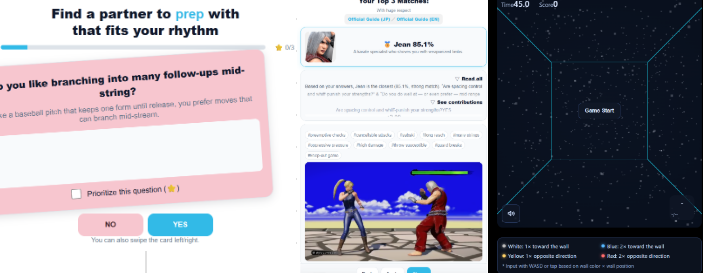
CharMatchingでは、自分に合うキャラを、あなたのプレイスタイルの希望に応じて探すことができます。
GYMでは、格闘ゲームに必要な反応や判断などをミニゲーム的にトレーニングできます。
リプレイスコープでは、自分の録画を対戦ごとに振り返り、気づきをメモして残せます。
選んだ試合をクリップに書き出し、YouTubeへ投稿したURLを登録して、録画やメモから映像を開けます。
どれもあまり構えず、気軽に試してみてください!
CharMatching helps you search for a character that fits your playstyle preferences.
In GYM, you can train the reactions and judgment skills necessary for fighting games through mini-games.
Replay Scope organizes your recordings into matches so you can review and keep what you notice.
Export selected matches as a clip, register the URL after uploading it to YouTube, and open scenes from your recordings and notes.
Don't overthink it—just give them a try casually!


ゲームの基本は、ゲーム内の各種チュートリアルと、こちらのオンラインリソースを確認してみるのはどうでしょうか?
いつ攻めればいいの?ガードはどうするの?などの、基本的な内容がしっかりカバーされています。
さらに最新のアップデート情報や、あの新作関連情報、キャラ別の技データ、キャラガイド、初心者ガイドなどにアクセスすることができます。
For the basics, why not combine the in-game tutorials with these online resources?
They solidly cover fundamentals like "When should I attack?" and "How do I guard?"
In addition, you can access the latest update news, information on New VF, character frame data, character guides, and beginner guides.
バトルシステム/バランス調整と技調整の変更点を確認
Check battle system, balance, and move adjustment changes
全技データの閲覧・検索・確反チェック
Browse moves, search frames, and check punishes
連携ルートを可視化して整理・共有
Visualize, organize, and share your strings